
Systemfehler: mfc110u.dll fehlt
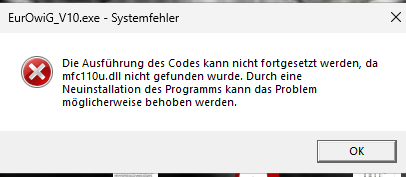
Die benötigte Installationsdatei vcredist_x86.exe finden Sie direkt im Programmverzeichnis von EurOwiG® VOWI.
Vorgehen:
Datei vcredist_x86.exe im VOWI-Verzeichnis ausführen
Installation abschließen
VOWI erneut starten
Die benötigte Installationsdatei vcredist_x86.exe finden Sie direkt im Programmverzeichnis von EurOwiG® VOWI.
Vorgehen:
Datei vcredist_x86.exe im VOWI-Verzeichnis ausführen
Installation abschließen
VOWI erneut starten